
How to use a pricking iron: straight lines, corners and curves
A tidy stitch line starts before the needle goes through the leather. Mark the line, work out where the holes will finish, and check the iron stays upright. Hitting harder will not correct poor alignment.
This method is for modern pricking irons and stitching chisels designed to punch through leather. Some traditional irons are intended to mark holes for an awl. Our guide to pricking irons, chisels and awls explains that distinction. If you are still choosing a style or spacing, start with choosing a pricking iron.
What you need
- A multi-tooth iron for straight runs and a two-tooth iron with matching spacing and tooth shape.
- A matching single-tooth tool or suitable stitching awl for individual holes.
- Wing dividers, a suitable non-metal mallet, and a stable punching surface.
- Offcuts matching the leather and number of layers in your project.
Keep the teeth away from a bare stone slab or metal bench. Use a suitable punching board and pad. The OKA cutting and punching board can be used with a Rhino vinyl pad above it for fine stitching irons.
1. Prepare the edge and mark the line
For a flat seam punched through assembled layers, align and secure the pieces first. Trim the edges flush: dividers following an uneven edge will produce an uneven stitch line.
Lightly mark a continuous line with wing dividers. Follow the pattern’s edge distance where one is supplied. There is no single distance that suits every thickness, hole size and project.
Mark the start, finish and corners before punching. Lay the iron along the line without striking it to see how the spacing fits. A short or oversized final stitch is easier to prevent while the leather only has light marks.
2. Find the right depth on an offcut
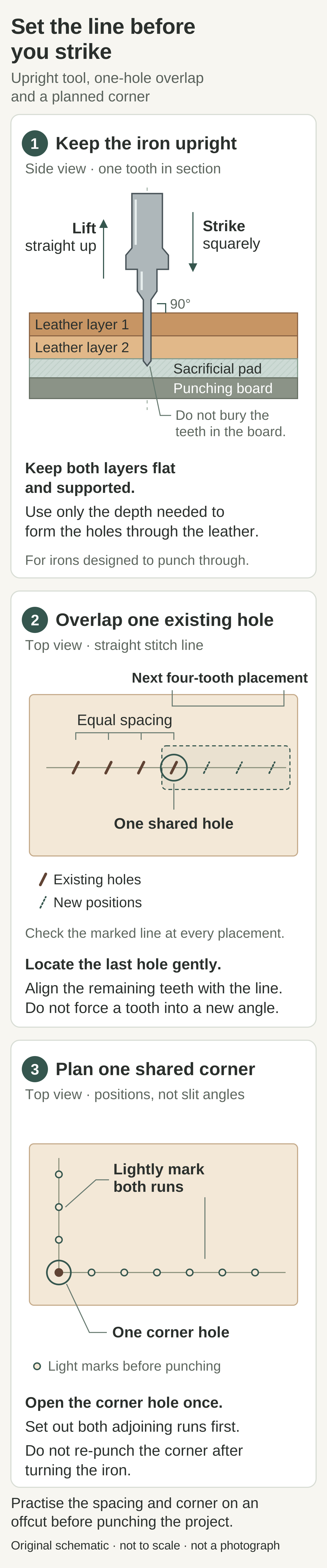
Use the same leather, layer count and support as the finished piece. Hold the iron upright and make a short test row with controlled blows.
Check the underside. For a through-punching tool, the holes need to pass through every layer. Stop once they are properly formed; do not bury the teeth in the board or drive the wider shoulders into the leather.
Try the intended needle and thread in the test holes. If the stack exceeds what the iron is designed to penetrate, use the marking-and-awl method instead of increasing force.
3. Punch a straight run and overlap accurately
Set every tooth on the marked line before striking. Look from the front and side: an iron can look upright from one direction while leaning in the other. Keep the leather flat and fully supported underneath.
Strike squarely with controlled blows. Stop if the tool tilts or the layers shift.
For the next placement, locate the first tooth in the final hole of the previous row, then align the remaining teeth with the line. This overlap carries the spacing forward. Let the tooth find the existing hole gently; forcing it into a different angle can widen the cut.
Check each short run as you go. Do not follow a drifting row simply because its last hole is already there.
4. Withdraw without stretching the holes
Hold the leather down beside the tool and withdraw the iron straight up. A pricking iron pull-out board supports the leather while you lift the iron.
Do not twist the handle or lever the teeth sideways. If removal takes excessive force, stop and check penetration depth, the punching surface and whether you are using too many teeth through a thick stack. Change one thing on an offcut before continuing.
5. Work around curves one hole at a time
Change to the two-tooth iron before the curve becomes too tight for the longer tool.
Use one tooth to locate the previous hole and the other to lightly mark the next position on the curved line. Lift the tool clear between placements. Around a tight curve, use these marks to set the spacing, then open each new hole separately with a matching single-tooth tool or suitable awl.
Do not rotate an embedded tooth to force the second tooth onto the curve. That enlarges the existing hole. Check the whole marked curve before cutting it, including where it rejoins the straight run.
6. Plan square corners and the last few holes
For a simple square corner, mark where the two stitch lines meet. Open one corner hole with the single-tooth tool, following the hole angle of the first straight run.
Lightly register the two-tooth iron at that corner to mark the next hole along each adjoining line. Start the longer iron from those marks and work away from the corner. Do not drive the corner hole a second time after turning the iron through 90 degrees.
If a run will finish with one very short or long gap, adjust the remaining lightly marked positions gradually and open those holes individually. Never bend the iron or stretch existing holes to make the spacing fit.
If the holes do not look right
- The front is straight but the back wanders: check sideways lean, flat support and movement between layers.
- The line drifts on both sides: check the marked line and each new placement. Overlap preserves spacing, not direction.
- Some holes do not reach the back: check uneven support or thickness changes before adding force.
- Holes become enlarged or ragged: check excessive depth, twisting during removal, and teeth being forced into earlier cuts.
Practise a straight run, curve and corner on scrap, then stitch them before punching the project. For the next stage, follow hand stitching leather for beginners. If the holes look consistent but the finished stitching does not, use our uneven stitching troubleshooting guide.